For many business in highly regulated environments (such as pharma, medtech, health care and financial sectors), social media may seem like a tool that is either irrelevant or too difficult to manage within stringent and often-changing regulatory parameters. Yet, the truth is, social media is just as applicable to these sectors as other B2B markets, and can be equally as effective. Being compliant and being quiet are not irreversibly fused.
Social media for B2B?
Yes, some of you out there may still think that social media is only for fun and games. Nothing serious is ever accomplished there, and even when serious topics (like politics) are discussed, it’s nothing but avarice and opinions. Right? Well, wrong.
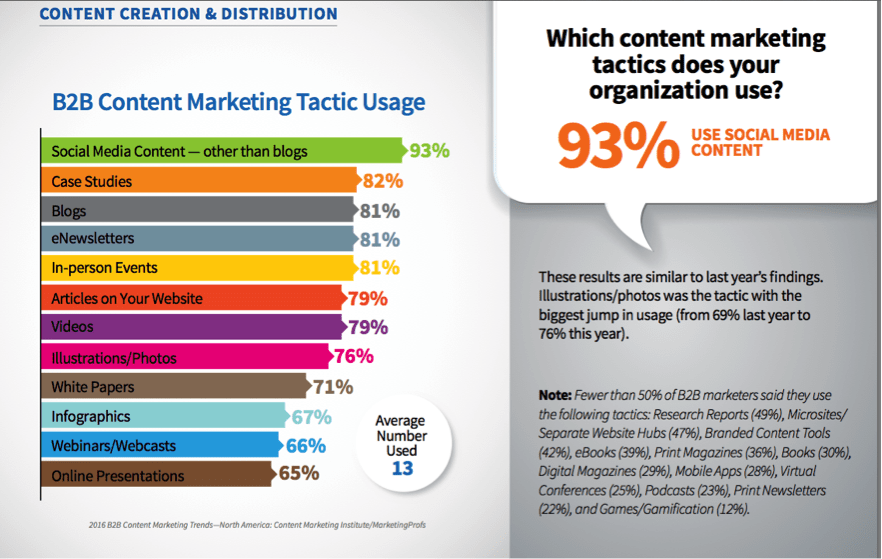
Social media is a very effective tool for many B2B companies not only for promoting their content (more on this here) but also for keeping tabs on the pulse of their markets — what’s known as social listening. In fact, according to a 2016 report from Content Marketing Institute, 93% of B2B marketing organizations use social media. However, according to the same report, only 35% have documented their social media strategy. This could be a major downfall to success (read on for tips below).
If you’re not monitoring or participating in the conversation, how can you possibly know what your customers, colleagues, partners and prospects are thinking?
This brings me to two important aspects of social media in the B2B world, including regulated industries like healthcare, diagnostics and medical devices. You must focus on both monitoring and engagement.
That translates into LISTENING and SHARING.
Social media monitoring and engagement
Monitoring (listening) in social media means following your customers, partners or networks on Facebook, Twitter, LinkedIn, YouTube and Google+ and other channels, and regularly checking your streams so you are aware of what others in your space are saying. You can use tools such as Hootsuite, HubSpot or Sprout Social to monitor important subject areas and “follow” people you want to stay connected to, setting up alerts for particular areas of interest or “hot topics.”
Engagement (sharing) in social media means contributing to the conversation with new content, thoughts, ideas, reports, images, infographics and other content that your followers and audiences might find useful. It’s not (just) about self-promotion, but also about sharing ideas and contributing to a conversation. Your contributions can be entirely original (such as predictions, posts or reports that you or your company have produced), insights or perspectives on work from others (like adding your comments on news about a new law or protocol) or sharing things you found useful (such as a “How to” article or seminar presentation from the last conference you attended). Apply a simple rule: if your content passes medical, legal and regulatory review processes, it’s a candidate to build an engagement strategy.
How to keep your content compliant
In any business, but especially in the regulated industries, managing your brand’s reputation and keeping your company safe from infractions (perceived or real) requires a few extra steps to ensure success. You’ll want to create a plan that is approved at the highest levels of your organization and followed by everyone in the company who posts on behalf of your brand. Here are some tips for creating a well-organized social media plan:
1. Create a set of guidelines.
The most important first step is to create a document outlining the issues that can and can’t be discussed. If you have proprietary new research or R&D that is classified, all of your team members should be made aware (and firmly reminded) that all such topics are off limits. Be very specific about the words they can and can’t use. However, they may find that the knowledge they have in these areas makes a useful addition to online conversations or in discussions on professional forums. In that case, they should be clearly instructed about what issues are “fair game” for discussion, and where the boundaries are that cross into proprietary, protected or regulated information. Your team should be well briefed in the difference between presenting new facts and helpful information, and any speculation that could appear as an endorsement or recommendation around regulated topics. (Get a sample social media guidelines template here).
2. Develop written talking points.
A simple document or guide that outlines to your team all the most important “themes” or areas of expertise for your company, such as focus areas or new business areas, will give your team the ammunition they need to focus where you want them to focus. You might think everyone knows what to concentrate on, but if you haven’t put pen to paper (or more likely, hands to keyboard), you can’t be sure they are all on the same page.
3. Prepare a content calendar.
Turn your talking points into a social media calendar with posts planned for a week or more at a time. Focus on topics around which your company has expertise and wishes to become known in the market. Include a combination of curated and created content (posts linking back to blog articles or research papers, as well as content you share from other experts, industry conferences or partners). Remember: you want your topics to be about issues, not products. Consider what challenges your target audience is facing and talk to them about things they care about. Mention the problems your products solve, not the brands. The exception would be answering or responding to specific questions that others may post online about your products. (Need inspiration? Download a sample social media planning template here.)
4. Institute an approval process.
In some industries, fly-by-the-seat-of-your-pants witty responses might win points. But in highly regulated industries, off-the-cuff remarks could end up costing you dearly. Make sure that all your content and comments are approved in advance. Create a written approval process (approval template documents help) that everyone on the team understands. Include an approval “check off” at the top of your editorial calendar or blog post templates to indicate who needs to approve it and by when.
5. “Chunk” your content.
One way to ease (and speed) the approval process for new posts is to pull your social media comments and ideas from pre-approved content. Create larger pieces regularly (such as articles, case studies or white papers) with ideas that can be approved all at once. Then, pull bits and pieces of this into social media-worthy posts that let you spread your content out over several weeks.
6. Rework and reuse existing content.
Similarly, you can reuse existing content by turning it into new formats without requiring a lengthy regulatory approval process. Turn a research paper presented at a conference into a series of infographics, Slideshares, or video for YouTube (have the writer or a company thought-leader read it on camera and mix in still graphics or slides with charts). Create Tweetable callout images from the key data that link to a page where people can read the entire report. Turn the presentation into an “interview” with the expert. Think about additional ways to present content that might appeal to your audience.
7. Get help.
If you need additional resources to ensure your content is appealing and also compliant, you might consider looking to outside experts. Look to outsourced resources who have experience writing for regulated industries and know the ins and outs of posting content to social media.
Have any other concerns?
Do you have other concerns about social media we didn’t address here? Ask us in the comments and we’ll be glad to help.
Even if the concept of inbound marketing is not new to you, you may find that some of the most commonly used vocabulary sounds a bit foreign or has meanings that are slightly elusive. But no matter what your native tongue is, we’ve got you covered with this glossary of the must-know terms for inbound marketing.
A
A/B Testing
Split testing two variations of an idea can help you determine which factors lead to better performance. The key here is to test one variable at a time. That can mean swapping out headlines, images, colors, layouts, offers or specific text. Anything really. As long as you only try to measure one element at a time, you can test any variable of your page, email or offer to see what improves your conversion rates. You might consider A/B testing elements of your social media campaigns as well.
Analytics
Analytics is an essential part of inbound marketing. Part art and part science, it requires not only that you consider what needs to be measured, but also that you interprete the data in meaningful ways to gain insights that will improve your marketing efforts. That may mean looking at your website visitor statistics to see which blog posts get the most views, which offers have the best conversion rates, what social media posts (or channels) deliver the most leads, and so forth.
B
Blog
Blog is a word that evolved from the term “web log” or “weblog.” In the early days, a blog was typically a website owner’s personal journal or story. Today that’s anything but the case. The term “blogging” covers all types of online content from company or business blogs to news posts to interpretations of scientific papers. Blogging is an important part of inbound marketing that helps companies attract prospects by offering them valuable content. It’s also an important strategy to improve your website’s performance in search engines (known as SEO, see below).
Bottom of the Funnel
The bottom of the funnel refers to the stage of a buying process in which prospects are about to convert to customers. They have recognized a problem, researched possible solutions and are close to making a decision (or in terms of the buyer’s journey, making a purchase). At this point (and not before), they are ready for a call from your sales team or a discussion about how your company can fill their needs.
Buyer’s Journey
The buyer’s journey is a way of looking at the buying process by aligning a prospect’s needs at each stage of the funnel with the actions they will take. The buyer’s journey usually follows this process:
1) Awareness: The buyer becomes aware that they have a problem or desire.
2) Information gathering: the buyer begins to gather more information about the problem or desire.
3) Exploring options: The buyer compares options and gets more details.
4) Decision making: The buyer is prepared to make a purchase and select a vendor. It’s important to keep in mind that the buyer’s journey will be different from one market to the next, and it’s typically a much more complex process in B2B than in B2C markets.
C
Call-to-Action (CTA)
A call-to-action is specific request that encourages a website visitor to take an action, such as “subscribe now,” “download ebook”, or “register” for a webinar. It maybe be presented as a text link, button, or image, and typically directs the visitor to a landing page to complete a specific action, such as filling out a form to become a lead. It’s important to make your CTA as action oriented and simple as possible to get the best results, such as: Get our ebook now.
Conversion Path
A conversion path is the prescribed way you intend to capture lead information. It typically starts with some sort of call-to-action (such as a button) that sends visitors to a landing page to complete a form and then redirects to a thank you page where they can download content.
Conversion Rates (or Ratio)
A conversion rate represents the ratio of people who are presented with an action to those who complete the action. This can mean the number of people who click on an ad (vs. number who view it), click a button or complete a form. Measuring conversion rates at each step of the conversion path helps you determine what part of your offer is working (or not working).
Content
By content we mean any information presented to your audience for education, engagement or sharing. Content could be a blog post, ebook, video, social media post, photo, slideshow, or podcast. Some content is created primarily to generate visibility or “mindshare” and is therefore presented in an open way on your website, and promoted on social media and content sharing platforms. Other content (which we sometimes call “premium” content) is only shared after your visitor provides information such as their name or email address to you.
CTR (click through rate)
Click through rate (CTR) is a measurement of the number of people who view a banner ad, button or offer compared to the number who click on it and go to your landing page. Measuring CTR helps you determine which offers or creative (versions of your text or images) are working the best.
CRM
A CRM, or customer relationship management system, is a tool used to improve and track interaction with your customers and prospects. It can range from a sophisticated front-end website order fulfillment process linked to customer service, or primarily be used to manage the marketing/sales process (such as this free one from HubSpot). CRMs can provide analytics, keep track of your customer’s journey, and manage lead scoring so you know when to turn leads over to your sales team.
D
Dynamic Content
Dynamic content is content that appears unique to each website visitor or offers a customized experience based on information you have collected previously about the visitor. By capturing data from website interactions (such as form submissions, IP address, or website page visits), you can ensure that each future website visit is a more customized experience. This can be applied to email, newsletter or blog content as well, by using data fields (such as <<first name>>, <<last name>>, or <<recent ebook download>>) within your text.
E
Email
The term email refers to “Electronic Mail.” Email is an essential element of inbound marketing because it allows you to send information directly to your contact’s attention. It’s important, though, to remember that the fundamental principal of inbound marketing is to create “likeable” marketing…and not abuse your relationship with your email contacts. Nurture your prospects by sending them only specific information they have requested and which helps them complete their buyer’s journey.
F
Facebook
Facebook is an essential content promotion tool for many inbound marketers. As one of the largest (and daily accessed) social media networks, Facebook provides the opportunity to put your content in front of a huge audience (1.59 billion monthly active users to be precise). Whether you use paid or organic promotion, Facebook is just one channel that can help your inbound content be found.
G
Google+
Started by Google in 2011, Google+ (pronounced “Google Plus”) is a social media platform that allows you to post updates across “circles” or business interest channels. Despite recent claims that Google is phasing out Google+ as a social media tool, it’s not true. (However, Google IS phasing out the requirement to use a Google+ login to access Google Photos, YouTube, Google Play and other services.) Google+ is generally considered an excellent content publishing tool for SEO reasons.
H
HTML
HTML is an abbreviation for Hypertext Markup Language, which is a coding language that determines how web page content is displayed online. Even websites built in a CMS (content management system) such as WordPress, Drupal or HubSpot, are based on HTML, and knowing some can be helpful for customizing the specific appearance of content on pages.
I
Inbound Marketing
We couldn’t skip defining this term in our inbound glossary, could we? Inbound marketing is a process of aligning content and information with a prospect’s needs in a way that nurtures the relationship from site visitor to lead to customer. Instead of using “old” outbound methods such as buying ads, email lists, or cold-calling prospects, inbound uses quality content to attract visitors and help you develop a relationship with them over time.
J
Javascript
It might sound like a coffee product, but Javascript is actually a programming language that supports scripts —or programs —written to execute specific tasks one at a time. (In technical terms, scripting languages are interpreted rather than compiled – I’m sure you were dying to know that). Javascript can be embedded into HTML to add functionality to a web page, such as different menu styles or graphic displays. It can be used to track data on website visitors and manage form completions. So if your website developer tells you he needs to add Java to your website, he’s not talking about caffeine.
K
Keywords
Keywords or “keyword phrases” are the terms (or topic areas) that get indexed by search engines like Google, Yahoo or Bing. Contrary to what some people think, you can’t just stuff a bunch of keywords onto your page (or in your meta tags) and expect it to do well in search results. Optimization requires knowing which search phrases your target audience might actually use and adding them in relevant ways to your page content. Of course, there are other factors involved in SEO as well (read more below).
KPI
In the broad sense, KPIs, or key performance indicators, are the measurable values that demonstrate how effectively a company is achieving key business objectives. In terms of inbound marketing, these are reflections of specific goals you may have for marketing growth, such as to gain X number of new customers per quarter, or double the number of leads from month 1 to month 2. By aligning your specific marketing objectives with broader KPIs you can help ensure success for your inbound marketing efforts.
L
Landing Page
Sometimes people use the term landing page to mean any website page to which traffic is directed (such as from an ad campaign). But in inbound terms, landing page refers specifically to a website page with a form that is used for lead generation. Landing pages are the conversion tools for turning website visitors into leads. A good landing page focuses attention on a single objective: getting a conversion (form completion). You’ll want to have a number of landing pages with different offers for specific personas at each stage of the funnel.
Lead Nurturing
Lead nurturing, similar to “drip marketing,” is an organized method of moving your leads down the sales funnel with a series of communications (such as emails or social media) to help you qualify a lead and then further engage them. It is a process that focuses on delivering useful content to a specific audience at the right time.
LinkedIn
As a business-focused social networking site, LinkedIn is the go-to choice for content marketing among many B2B companies. In addition to creating a presence online, it’s a way for a company to maintain a thought leadership role around specific topics (by posting content updates and long form posts) and participating in group discussions.
M
Marketing Automation
Marketing automation is the process by which lead nurturing happens. It makes use of a collection of tools such as database management, list segmentation and email distribution to automate and personalize delivery of content designed to move your prospects closer to sales, or to keep existing customers happy. Your email delivery can be scheduled to happen based on specific actions from a prospect (such as visiting a particular website page or downloading an offer), time periods (such as three days after downloading an ebook, or once a week like a newsletter) or other conditions (such as if the prospect is on a particular list or meets a demographic profile).
Meme
The key issue question many people have about this term is how to pronounce it. Say “meem,” which rhymes with team. The traditional definition of meme is a thought or idea that is spread from person to person rapidly. But in the Internet age, it’s taken on a whole other aspect. I’m sure you’ve seen these— particularly on social media—they are typically a humorous image, video, or piece of text that is copied (often with slight variations) and spread rapidly by Internet users. Good memes have the makings of powerful viral content. There’s even a website you can go to make your own: makeameme.org. Here’s an example:
Middle of the Funnel
This stage of a buyer’s journey happens after a prospect recognizes or puts a name to a problem. Their goal at this point is to find a solution to the problem – to consider products or ideas that will help. It’s the stage for introducing case studies, product brochures or other materials that show how your business can solve the problem.
Mobile Optimized
With Google’s addition of mobile optimization as a search ranking criteria in mid-2015, having a mobile-friendly or responsive website went from be optional to critical. Mobile optimization is the process of ensuring that visitors who access your site from mobile devices have a good experience (meaning, for example, not having to scroll left to right to see your page and having font sizes large enough for viewing on small screens). It’s more important than ever to make sure your website conforms to mobile-friendly techniques. Does yours? Get a free mobile readiness evaluation here.
N
No-Follow Link
A no-follow link tells search engine crawlers not to follow or pass “link credit” to websites or pages linked from your page. Why would you do that? The main reason is usually to avoid having your website flagged for duplicate content (which can look like spam to search engines) or for reasons such as paid links, embedded content, comments or anytime you don’t want your website to be seen as “endorsing” the linked content.
O
Offer
An offer is what you trade for a prospect’s email address or demographic information. It could be an ebook, white paper, webinar, checklist, template or another piece of relevant and valuable content.
Off-Page Optimization
This part of the SEO puzzle refers to incoming links and other outside factors that can impact your website’s search engine rank. Typically it means having the right sort of pages linking to you, including social media sites. You can help boost your off-page optimization with good social media and link-building strategies. It’s important to stay away from “black hat” techniques like paying to be included on “link farms,” however, as search engines increasingly penalize websites severely for these tactics.
On-Page Optimization
As part of an SEO effort, on-page optimization refers to the steps you take to improve the content within the pages of your site, as well as the HTML code. It typically involves making sure your keywords appear in important areas of the page (such as the headline, page title, alt tags and URL) and within the visible page text.
Opt-In
Opt-in refers to the process of collecting email addresses only from people who have requested to hear from you. An “opt-in” list means that someone has filled out a form on your website and given you specific permission to contact them. (In contrast, opt-out means they have asked to be taken off your list). Both of these processes are important to ensure you have a “clean” list — not only a best practice for inbound marketing, but also an essential one for compliance with international anti-spam laws.
P
Persona
Sometimes referred to as a “buyer persona,” this is a representative profile of your target customer. You create a buyer persona by visualizing your ideal prospect, considering what they do, think and feel, and identifying their core problems or concerns. Creating buyer personas will help you more clearly visualize for whom you are creating content and how to segment your lists.
PPC
PPC (or Pay-Per-Click) is a form of advertising in which you pay for each click on your message. It’s a commonly used format on Google Adwords and sites like Facebook. It’s an alternative to CPM, in which you, the advertiser, pays per impression or each time your message is delivered, not just when it receives a click.
Q
Qualified Lead
For a lead to be considered “qualified,” the person must have taken an action that shows they have an interest in your business or that they meet specific criteria which would make them a good customer for you. With inbound marketing, you can set the criteria around which you qualify a lead (such as their industry or location) by adding questions to forms or using logic based on which pages they visit (such as a pricing page).
QR Code
A QR code (abbreviation of Quick Response code) is a type of graphical barcode that can be read by scanners or camera phones. It’s typically used by marketers to quickly send people to a specific landing page or website offer without having to use a long URL.
R
Responsive Design
This type of website design takes into consideration how a web page looks across various devices, such as on tablets or mobile phones. A web page built with responsive design automatically resizes itself as the browser window grows smaller, and reflows the content in a way that makes it easy to view and navigate. So rather than a page appearing larger than the screen, it resizes to keep all the content within view. In addition to the obvious usability advantages, responsive design became an important element of SEO when Google made mobile friendliness a part of its ranking algorithms in mid-2015.
S
SEO
SEO (or Search Engine Optimization) is a process for improving a website’s chances for ranking more highly in search engine results. It includes both on-page and off-page elements and is sometimes thought of as a form of black magic (just kidding) but it’s really just a series of tactical steps to improve your website’s ability to be found by those who you want to find it.
Spam
This may sound like a canned meat product, but what we’re talking about here is unsolicited email. Sending out bulk email to people who haven’t asked to receive it (or “opted-in”) is considered spam, and with the passage of anti-spam laws in many countries, it is a punishable offense. How do you avoid breaking the law? Make sure you only send email to people who have asked to hear from you and filled out a “subscribe” or “contact me” form on your website. The term spam is also used in SEO to refer to “stuffing” keywords or content onto a website in attempt to fool search engines into ranking your site more highly (an offense punishable by being blocked from search engine results altogether). How do you avoid being blacklisted? Simple: Keep your content relevant and written for humans not “robots”.
Social Media
Once upon a time social media was considered nothing but fun and games. Today, however, savvy markers consider it an essential channel for helping to spread the word about their content and brand. Social media platforms such as Facebook, Twitter, YouTube, Google+, Pinterest and Instagram are powerful tools for many companies in developing a relationship with their audience(s) as well as getting feedback on their brand.
T
Thought Leadership
Thought leadership might seem like one of those vague marketing terms like “brand relevance” but in truth, it’s a very important and compelling reason for companies to create original content. In addition to the practical use of content in generating leads, producing original, quality blog posts, white papers or ebooks and other information, helps establish your company and people as thought leaders, or experts in your market. When it comes to brand-building, expertise goes a long way toward generating credibility and sales.
Top of the Funnel
Top of the funnel refers to the very first stage of the buying process. At this stage, prospects are just starting to recognize that they have a problem or need and put a name to it. They turn to the internet to search for information. Smart inbound marketers make sure their company is offering content that helps people at this stage define their problem and start looking for a solution.
Twitter
To make this definition relevant, let’s keep it to 140 characters or less, which is the limit for communication on this social media site: “Twitter is a tool that lets people publicly share short messages, images and URLs. Users can follow each other or interests via #hashtags.”
URL stands for Uniform Resource Locator and was invented by Sir Tim Berners-Lee, a software engineer atCERN, a large particle physics laboratory near Geneva, way back in ancient times: 1989. A URL serves as an address for a piece of information — whether a page, image or document — that can be found on the world wide web (which Sir Berners-Lee is also credited with inventing). The naming of your URLs (such ashttp://www.upthereeverywhere.com/inbound-marketing-services) can be an important factor in SEO.
V
Viral Content
Viral doesn’t mean your computer is sick. It’s a reference to the phenomenon that happens when a bit of content gets quickly and exponentially shared around the world. In the “old days” this often meant by email, but with the introduction of social media, it typically means your content has generated millions of “likes” and “shares” across various platforms. “Going viral” these days usually equates to millions of views.
W
Website
A website consists of all the interconnected web pages that together form a virtual home of information or content from a person, company or organization. The home page of a website (which corresponds to the main URL such as www.upthereeverywhere.com) is often thought of as the front door, but other pages of the site, especially blogs or very well optimized content, may actually be the first point of contact that a person has with a website. Good inbound marketers realize the importance of these other pages and work hard to make sure they create relevant dynamic content that will attract each of their target audiences.
Workflow
Workflow is a term used to describe a lead nurturing process. It includes the steps that need to happen to provide the right content to the right person at the right time. This can mean sending an email, adjusting a database field (such as changing a contact’s category from “subscriber” to “lead”) or adding a contact to a particular list (such as an ebook offer or a newsletter) when they reach a specific stage.
X
XML Sitemap
XML is a markup language that (among other things) allows the parts of a website to be categorized. An XML sitemap is a way to publish a list of all the links within your site, making it easier for search engines to index them. Publishing an XML sitemap is like issuing an invitation for search engine spiders to come visit.
Y
YouTube
YouTube is the largest video-sharing website in the world and provides a way for users to upload, share, and view videos. In addition to being a valuable content-sharing site, it’s become a launching pad for wannabe celebrities (Justin Bieber anyone?). YouTube is owned by Google so content published there has some obvious SEO advantages. It’s generally considered a social media platform because of the user interaction and discussion that happens, but increasingly it has become a business-focused advertising platform and streaming network to rival traditional TV. Like this example from UP’s YouTube channel:
Z
Zentation
Zentation is a content sharing platform, and since its name starts with Z, we decided it should be on our list. Zentation is a software program that lets you marry your Powerpoint presentation with video content, which is pretty cool if you want to post content from a seminar or webinar to your website. Check it out here: www.zentation.com.
Inbound marketing isn’t just for consumer-facing companies. In fact, for many B2B companies, especially in what we often refer to as “high involvement” markets, long and complex sales cycles mean a lot of information must be exchanged with a prospect before a sale is made. This creates a perfect situation for inbound and content marketing to become effective.
So what exactly is inbound marketing?
Inbound marketing refers to marketing activities that bring website visitors IN by providing the information they are seeking, rather than going OUT and interrupting people with messages or ads in which they are not interested. Inbound is a process of aligning content and information with a prospect’s needs in a way that nurtures the relationship from site visitor to lead to customer.
Instead of using “old” outbound methods such as buying ads and sending email to purchased lists, or cold-calling prospects, inbound relies on quality content, online conversations and SEO to bring prospects to your website. You then build a relationship with these people over time by continuing to offer useful information and relevant insights to them.
In short, inbound marketing is a program of content creation that is:
optimized on your website for SEO,
individualized to prospect’s needs,
responsive to what potential customers want, and
delivers information (content) that helps them make better buying decisions through a variety of online, social media and email channels.
Inbound and content marketing
The way customers seek out information has in undergone a fundamental shift over the last decade. Customers are actively seeking out new information channels and sources of authority in their fields. They want to know how to do their jobs better, and look for resources that can help them do that.
Customers no longer wait for a sales person to call to get information about a product that may help them do their jobs better. In fact, company websites may not even be the first line of information gathering for many people. They check out social media sites or peer-facing discussion pages, or whatever comes up first on Google.
Simply pushing product information out through advertising on mass media doesn’t work. You need to have your information timed to what the customer needs to know, not tied to your internal marketing cycles.
Information not advertising
Customers are looking for solutions to their problems. And looking for ways to help them do their jobs better. They turn to the Internet for information, advice and recommendations from their peers on what works.
If a potential customer searches on “how to get better results in (insert your area of expertise here)”, will they find information related to your company or product’s business area in Google? Have you created the online content that helps people looking to solve a problem consider your product in their frame of reference?
If they’re searching, and you’re not there offering the information they need, where will they get that information? Probably from people who know less about your market that you do, and potentially from your competitors.
Creating this sort of “top of funnel” content is what makes the difference for inbound marketing – and for successful sales in today’s online world.
Inbound marketing solutions
Inbound marketing software solutions like HubSpot, help you manage, monitor and analyze your marketing activities in order to generate high quality leads that more readily convert to sales. By nurturing your potential customers through the sales funnel with the right content provided at the right stages, you can shorten the sales cycle and make the sales person’s job easier.
Since the start of the digital age, the role of marketing and advertising in companies has been shifting. Where the role of marketing was once primarily promotion or branding, today it’s increasingly about delivering leads to the sales team. Qualified leads – in a measurable way.
With the rise of inbound marketing, the shift has continued with an even greater emphasis on measuring the impact of marketing work. That means tracking the number of interested prospects and measuring the conversion rates of visitors into leads and then customers. In other words: to prove ROI.
Proving ROI: a core tenet of inbound
So that is the theory. But is it being put into practice? And if so, does it work the same way everywhere around the globe?
The 2015 State of InboundReport from HubSpot answers some of these questions and others. HubSpot (the marketing automation software company) conducts an annual survey of marketing departments around the world, and this year’s survey included more than 150 countries with 4,000 respondents, primarily in B2B companies. It included companies who use marketing automation tools as well as those who do not.
Among other things, the report answers questions such as: How do marketing challenges and priorities differ by country? Does ROI matter equally in all countries? How does the acceptance of inbound compare internationally?
ROI: Lip-service or practice?
If we ask any of our team members who work on international business development in countries such as Sweden, the Netherlands, Belgium and even the UAE, they will say the B2B companies they talk to claim to care about ROI. Yet, many of them are lacking a defined way of measuring their leads. Or even a defined process for sales to follow-up on leads generated by marketing.
The State of Inbound Report paints a similar picture. In fact, it shows that fewer than 43% of sales teams even have contact information before reaching out to a prospect. And even fewer (only 21%) have any information about the prospect’s interaction with the company website.
Only 21%. Website interaction data is basic information any analytics tool or marketing system like HubSpot provides. Yet marketers aren’t using it, or maybe they don’t know where to find it?
But back to ROI. Does it really matter? Are companies taking action based on it? That may vary by country. According to the report, companies in North America, Australia and New Zealand are more concerned with measuring ROI (56-59% listed ROI as the top marketing priority) than those in other parts of the world like Europe, the Middle East and Asia (46% said it was a top priority) or Latin America (where 49% said it was most important).
North America was also the most likely to track ROI and know what their ROI was at all, let alone achieve the goals. This might make sense, in part, since the “inbound revolution” started there.
“In theory, everyone is focused on ROI. In practice, lots of companies don’t measure much. If they get new leads, they’re happy, they don’t look further,” said one business development manager in the Benelux region of Europe.
So what does it mean? In general, marketers seem to understand the importance of measuring ROI and setting goals, yet the vast majority, especially in international markets, are still falling short of reaching their goals. Does this reflect a matter of practice or uncertainty about how to measure ROI?
Such low numbers may also suggest that a lot of companies are only just discovering the power of digital media compared to “old” media. A 2013 survey from a Belgian company called Acerta showed that only 41% of companies in Belgium with more than 1000 employees were using digital assets, and under 1000 employees, the number dropped to 36% and under 10 employees, it was just 27%.
Furthermore, some companies may have jumped onto the digital bandwagon or into using social media “because everyone is doing it” but without a clear idea of how to measure ROI.
“I have even heard marketing consultants say (about social media), ‘It doesn’t do anything for you but you need to be on it because your competitors are there’ <<facepalm>>,” said Marie-Helene Dibenedetto, an UP digital media consultant in Belgium. They clearly lack an understanding of how to create measurable social media campaigns. (Hint: it’s not that hard if you use the right tools).
Yet, next door in the Netherlands, things are somewhat different. The Dutch market is very mature in terms of Internet adoption (9 out of 10 homes in the Netherlands are connected to the Internet). This means a lot of businesses are heavily focused on driving online sales.
“Business here – think retail, but also insurance, financial services and utility providers − are more integrated in their marketing compared to what I see in the rest of Europe and Asia,” said Roupert Muller, a digital and social media consultant in the Netherlands. “Most businesses are using a mix of organic and paid advertising, social media (organic & paid) and content marketing with a heavy focus on delivering a proper mobile experience.”
In other parts of the world, changes may be happening faster. As a relatively new open market, Dubai has a focus on international marketing with a modern approach to business. For growing economies like this one, a clear focus on metrics and business development may mean that generalizations about international marketing and results like those in this survey may be about to change.
“As companies focus on building an international market, they are looking to create best practices and follow methodologies that have been proven effective elsewhere,” saidAsra Eftekhari, an UP marketing consultant in the UAE. “They are willing to invest and hire the experts who can provide training or establish measurement systems.”
Inbound is world-wide
One thing the report showed for sure: The global community is united in favor of inbound practices. The days of interruption marketing and relying on print ads for lead generation are over. In all five international regions, a 3:1 ratio emerged between those who considered their organization inbound-driven versus outbound-driven.
“In Sweden, we are seeing a growing interest not only in the inbound methodology but also in creating processes and tools for measuring ROI, as well as accurately tracking lead generation. Inbound has definitely arrived here,” said UP Swedish Inbound Marketing and Digital Consultant Anders Westholm.
Are you using LinkedIn to build your brand by creating content that shows your area of expertise? LinkedIn introduced the “long-form” post a little over a year ago. You can use it to post original content (blogs) that will be seen by your network.
Your long-form posts should be business related. For example, you could post about trends in your industry or new technology developments. Maybe include a round-up of top articles that feature your company or product. Or post a blog from your company’s website. Just be sure to link back to your original blog post to preserve your website’s SEO.
Don’t have a blog?
Some companies use LinkedIn long-form posts as their primary means of blogging. Perhaps your website isn’t currently set up to manage a blog, or your company isn’t sure about blogging? You can still develop thought leadership in your personal areas of expertise by publishing articles in this format that share valuable information with your business network.
How? Create your long-form posts and then share it on your Company’s LinkedIn Page and your own profile page. (You’ll need to have admin rights to your company’s LinkedIn Page to share it there). If you don’t, ask someone who does to share your post there as an update. And be sure to use the social media sharing tools to promote it beyond LInkedIn.
The era of marketing automation has brought new and powerful tools to the hands of sales and marketing teams. Our arsenal today includes a means to collect customer and prospect data (we never use the term “spying” *wink*), personalization of offers and even the all-important ROI analysis.
But there may be some confusion or overlap in the minds of marketers about the differences between various kinds of software tools. You may wonder, “How do I compare apples to apples? Or am I lumping in grapefruits?
CRM software and marketing software are meant for different stages
of the sales and marketing funnel.
The comparison may get even more complicated when you consider that some marketing automation tools, such as HubSpot, may seem to overlap with tools such customer relationship management (CRM) systems. In fact, HubSpot recently added a CRM directly into its marketing software system. So where do you draw the line?
What is a CRM?
First of all, it’s important to consider that definitions of these tools can be highly subjective depending on who is using them. In fact, a CRM (typically considered a sales or customer support tool) could even be considered marketing software, because the marketing team uses it.
That being said, it might make sense to create a broad definition of what each of these tools are:
A CRM – is a repository (database) of information for managing customer relationships
Marketing software (and in particular, marketing automation software) – is used to take actions toward customers and leads
To make the distinction more clear-cut, we’ve outline five essential differences between CRMs and marketing software.
Five essential differences
What it’s used for: Database vs. control center.
A CRM is a repository of customer history and information such as addresses and phone numbers, while marketing automation software is used to perform specific actions. A marketing automation tool allows you to create workflows and send emails or offers to particular customers at a particular time, based on the information they have asked (opted-in) to receive.
How it’s used: Sales interactions vs. website tracking.
A CRM is useful for tracking sales and customer support interactions with a customer by logging individual email contact and phone calls. It keeps track of all customer purchases and preferences. A marketing system, however, will track a broader set of data about prospects BEFORE they become customers, such as web pages they have viewed, social media sites they have interacted with and ads they have viewed.
Who uses it: Sales vs marketing.
Again, there can be some overlap here, but a CRM records every instance of contact with a particular customer into one aggregated dataset. (Every sales, customer service, and marketing touch can be recorded). Marketing software is a tool designed to measure and collect information about marketing campaigns: which emails generate leads and clicks, which ads pull in the most website visitors, which blog posts get the most readership and conversion on offers, which social media posts or Tweets got responses and views.
When it’s used: After conversion vs before.
A CRM primarily collects information after a lead is known and helps identify the best customers. Marketing automation software aggregates information about the customer that begins before the person has any sales contact by using website forms and online analytics to gather data.
Why it’s used: Customer maintenance vs lead nurturing.
A CRM is used to foster and maintain customer relationships while a marketing automation system is primarily used to nurture leads at the top of the funnel in order to convert them to customers. Marketing software provides personalized content to the prospect in order to CONVERT the prospect to a lead, which is why it is primarily used by the marketing department.
As we mentioned, many of the tools in both a CRM and marketing automation system can overlap. And in fact, often both Sales and Marketing departments have access to and may use both sets of tools. The difference will be the kinds of information and actions they want to get from the systems.
Marketing will be more focused on using the tool to generate leads at the top of the funnel, and Sales will be more concerned with the activities that happen to convert the leads into customers –and what happens with the customers after the sale.
Marketing systems may increasingly be useful in the later part as well, because they can manage email campaigns and content that help upsell customers, support re-engagement or get customers to share information with their own friends and contacts.
When it comes to using Facebook for business, many people wonder what the secret for success is. What kinds of posts get the best results, and how can you increase engagement? Are there things you should be doing that you’re not?
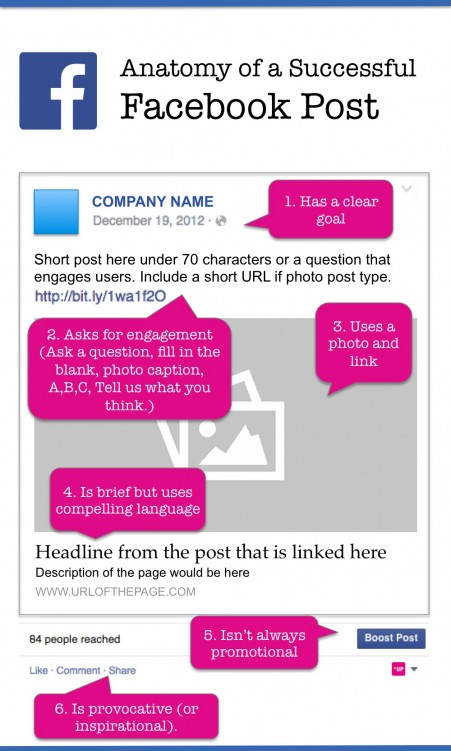
While there is no one single right way of creating a perfect post, there are some best practices you can follow to help make your posts more successful. We’ve dissected the key elements of successful Facebook posts so you can properly optimize yours.
But be warned, it’s not all kittens and dancing babies here. You’re going to have to think a little harder about what your business audience needs.
The top six things that make up a truly valuable Facebook post…
1) Has a Clear Goal
The key to a successful Facebook post is to start with a clear objective. What do you want this post to do? Drive traffic to your website? Encourage comments that build community? Get people to share it? Spark a debate? If your post has a specific objective it will be much more effective. And that objective should be obvious.
If you want someone to click on a link and read your blog post, use an enticing headline. If you are introducing a new product, offer a special deal or limited time offer to encourage clicking. Here is an example:
2) Asks for Engagement
A successful Facebook post has a clear call to action. It asks people to follow through in a specific way using words such as “subscribe now,” “share your ideas,” or “tell us what you think.”
Use specific language but be realistic: you can’t expect people to write an essay about how great your product is. Ask them for personal experiences, or opinions on specific situations. Remember, the goal of engagement on Facebook is primarily to build a community and create an interactive outlet of trust and sharing.
Several tried-and-true types of posts to generate engagement on Facebook are:
Asking a question. It can be relevant to your product, your audience’s profession or their lifestyle (such as “Blue/black or white/gold?)
Fill-in-the-blank statements. Posting a statement asking for a specific response (such as, “The one thing I can’t live without at work is ________.”)
Photo caption. Posting a photo (or video) and asking for a funny (or relevant) caption is a great way to get user engagement. (#captionthis #photocaption)
A, B, or C options. Posting a statement or photo and asking people which option they agree with. (“If your coworker misses a deadline that affects your delivery, would you rather: A) pick up the slack B) call him out on it C) tell your mom).
Be careful about requesting or requiring people to post something to a friend’s page. Facebook frowns on that sort of activity, which crosses a line to spamming. You may ask people to share something, but never require them to post on another person’s Wall (aka Timeline).
In the example below, the company asks for comments about a new product. The engagement level was high with more than 250 comments and 40 shares.
In this example from Walmart, the company uses the #CaptionThis approach. (OK, I lied — kitten photos get attention.)
3) Includes a Photo and a Link
While photos are typically superior to text-only posts in generating interaction, Facebook reports that link posts outperform photo posts (with links) in generating clicks. Just be sure that when you share a link on Facebook, the page you’re sharing has an image that will appear in the News Feed (a large picture will appear below your post along with a headline and some text when you paste in the URL.)
If not, you might be better off creating a photo post instead with a short link. To do that, click on the photo icon in the status area, and upload a photo. Be sure to add your text and a shortened URL (use a URL shortener such as bitly or owl.ly into the photo description area. Here is an example of a photo post with shortened URL.
URL links in photos (above) may be less effective than linked posts (below) in generating clicks on Facebook. But the photo is very compelling and generated more than 190 shares, as well as over 6,000 likes. The example below is a linked post with a compelling photo.
4) Is Brief, but Uses Compelling Language
Some studies (such as this one by TrackSocial) have shown that posts with fewer characters (ranging from 40 to 70) get the best results.
Use compelling yet concise language, but avoid “click-bait” phrasing. Click bait refers to using vague or misleading language such as “You’ll never believe the five things this guy said…” to generate clicks, without fulfilling the promise made by the statement. Facebook is working to penalize this practice, and it’s not a good long-term strategy for driving user engagement or lead generation. If people feel misled by your posts, they won’t come back for more.
5) Isn’t Always Promotional
Be careful not to let your Facebook Page turn into a stream of advertising. Occasional promotions and offers are expected and effective, but you need to balance getting with giving by offering useful content to your audience and being mindful about building a sense of community.
Your posts should be a near 30/70 mixture of promotional content (with links back to your website) and value-added content, in which you share relevant information that your target audience would find useful or interesting or develop the community.
Occasional humor, as long as it’s not offensive and is appropriate for a business audience, is appreciated and can be very effective. You really have to know and understand your audience to make this successful (build your personas!).
The post below from HubSpot is an example of offering valuable educational content to your audience. This post is not promotional, and not even related to HubSpot’s offering, but it has a very high level of sharing among readers (1,000 shares). People appreciate it when you share what you know—without asking anything in return.
6) Is Provocative (or Inspirational)
Posts that subtly (or not so subtly) tug at your audience’s inner sense of self-worth, or touch on viewpoints with which they can strongly identify, can generate a good response. Be cautious to avoid political, controversial or negative topics (unless that is the underlying goal of your Page). Positive memes and quotes that people can identify with help create a strong connection to your audience for your brand. Make sure the sentiments you post are authentic.
Photos with inspirational thoughts typed into the image (as memes) are a highly effective way of getting shares.
In the example below, Cisco promotes involvement with a women’s tech movement.
The brand-focused meme below from Burt’s Bees is both positive and shareable.
Keep it Real, and Relevant
In conclusion, it’s important that your posts provide an authentic representation of your brand and engage your audience in a way that shows you understand them and their needs. Be clear and direct, use photos and videos, include a call to action, and link back to your website when relevant. It’s the same advice you’ll hear from any good inbound marketer.
So next time you write a Facebook post, follow these 6 guidelines to be as effective as possible.
Need a better way to keep track of your social media posts?
The trifecta of powerful website design today is one that attracts the right audience, generates leads, and accurately represents your brand and tone of voice. While it’s not an easy task to create a site that successfully does all three things, it’s not impossible either.
For brand managers and website designers, the key focus is often on the site design – how it looks and whether or not it presents an appropriate brand image. This may lead to a tug of war between form and function. But you must not overlook the importance of search engine optimization (SEO) in attracting the right audience and delivering leads. After all, your website isn’t just a pretty face, it needs to work for you as well.
Don’t let any of these five common design mistakes destroy your website SEO.
Common website design mistakes
1. Splash pages.
Starting a website with an intro screen and little relevant content is a sure-fire SEO killer. Creating entry pages (such as those with a huge graphic and only one link like “click here”), tell Google (and other search engines) that your page is nothing but a large advertisement. Quality websites have content on every page, including the home page. Make sure your home page showcases the best of you have to offer and includes copy that is frequently updated.
2. Lack of compelling content.
Websites that put all the emphasis on design and have very little content are doomed to end up at the bottom of SERPs (search engine results pages). A successful website uses design to help showcase the important content and direct the readers to what matters. The easier it is for them to find what they are looking for, the longer they will stay on your site. (And perhaps come back again or tell others about it by “sharing” your content).
Readers “vote” for your site with their eyeballs and visit duration. The longer they stay on a page (because they are reading relevant content), the more search engines will reward your site with higher rankings. But it’s also important that your content is relevant not only to your target audience but also relevant to the keywords for which you’ve optimized your page. (You did optimize your page for keywords, right?)
Adding focused content to each page, so that each page is about a particular “topic” will help your website attain better SEO. Write your pages using the language and keywords your potential customers would use when searching for your products or services or for solutions that meet their needs.
3. Too many images, too little text.
A website that is made up primarily of images or worse Flash (no one is still doing that in 2015 right?), has very little meaty content for search engines to index. A picture may be worth a 1,000 words, but 1,000 words will do more for your website SEO.
Flash may be OK for Jim Carrey (he doesn’t need SEO) but if you want people to find your content, don’t create your entire site out of Flash, even if it is very creative, fun and beautiful.
Here again, what you need is a careful balance between what is appealing to your audience graphically, and content that will improve your website’s SEO. Finding the ideal balance between text and images is essential if you’re relying on website traffic to deliver leads. If you don’t care about people finding you on search engines, then by all means design that eye-popping flash site that showcases your design brilliance.
4. Slow page loading.
A poorly designed site, such as one with bad coding or too many large, heavy graphics, will load slowly. This is a kiss of death to your website SEO. Speedy page load times are essential to an optimized website.
Google has stated that page load times factor into site rankings. The assumption here is that faster loading makes happy visitors, and happy visitors are what Google is after, as well you should be.
5. Ineffective page, title and image naming.
Failing to name your images (the “alt” text that appears on image hovers), page meta titles (which appear in browser windows), and URLs with your keywords is a common mistake, but these are among the important elements for good on-page SEO.
Don’t leave the name of your pages, images and URLs up to your developer or the person entering your content. Create a focused program that addresses your website keywords and matches your page content. The titles, URLs and alt tags for each page should be unique and reflect the content of that page. What matters is relevance. Describe and name your content in a way that is meaningful to your audience. That’s not so hard right?
The era of marketing automation has brought new and powerful tools to the hands of sales and marketing teams. Our arsenal today includes a means to collect customer and prospect data (we never use the term “spying” *wink*), personalization of offers and even the all-important ROI analysis.
But there may be some confusion or overlap in the minds of marketers about the differences between various kinds of software tools. You may wonder, “How do I compare apples to apples? Or am I lumping in grapefruits?
CRM software and marketing software are meant for different stages of the sales and marketing funnel.
The comparison may get even more complicated when you consider that some marketing automation tools, such as HubSpot, may seem to overlap with tools such customer relationship management (CRM) systems. In fact, HubSpot recently added a CRM directly into its marketing software system. So where do you draw the line?
What is a CRM?
First of all, it’s important to consider that definitions of these tools can be highly subjective depending on who is using them. In fact, a CRM (typically considered a sales or customer support tool) could even be considered marketing software, because the marketing team uses it.
That being said, it might make sense to create a broad definition of what each of these tools are:
A CRM – is a repository (database) of information for managing customer relationships
Marketing software (and in particular, marketing automation software) – is used to take actions toward customers and leads
To make the distinction more clear-cut, we’ve outline five essential differences between CRMs and marketing software.
Five essential differences
What it’s used for: Database vs. control center.
A CRM is a repository of customer history and information such as addresses and phone numbers, while marketing automation software is used to perform specific actions. A marketing automation tool allows you to create workflows and send emails or offers to particular customers at a particular time, based on the information they have asked (opted-in) to receive.
How it’s used: Sales interactions vs. website tracking.
A CRM is useful for tracking sales and customer support interactions with a customer by logging individual email contact and phone calls. It keeps track of all customer purchases and preferences. A marketing system, however, will track a broader set of data about prospects BEFORE they become customers, such as web pages they have viewed, social media sites they have interacted with and ads they have viewed.
Who uses it: Sales vs marketing.
Again, there can be some overlap here, but a CRM records every instance of contact with a particular customer into one aggregated dataset. (Every sales, customer service, and marketing touch can be recorded). Marketing software is a tool designed to measure and collect information about marketing campaigns: which emails generate leads and clicks, which ads pull in the most website visitors, which blog posts get the most readership and conversion on offers, which social media posts or Tweets got responses and views.
When it’s used: After conversion vs before.
A CRM primarily collects information after a lead is known and helps identify the best customers. Marketing automation software aggregates information about the customer that begins before the person has any sales contact by using website forms and online analytics to gather data.
Why it’s used: Customer maintenance vs lead nurturing.
A CRM is used to foster and maintain customer relationships while a marketing automation system is primarily used to nurture leads at the top of the funnel in order to convert them to customers. Marketing software provides personalized content to the prospect in order to CONVERT the prospect to a lead, which is why it is primarily used by the marketing department.
As we mentioned, many of the tools in both a CRM and marketing automation system can overlap. And in fact, often both Sales and Marketing departments have access to and may use both sets of tools. The difference will be the kinds of information and actions they want to get from the systems.
Marketing will be more focused on using the tool to generate leads at the top of the funnel, and Sales will be more concerned with the activities that happen to convert the leads into customers –and what happens with the customers after the sale.
Marketing systems may increasingly be useful in the later part as well, because they can manage email campaigns and content that help upsell customers, support re-engagement or get customers to share information with their own friends and contacts.
I do. Here are some tips and ideas for putting visual storytelling to work in B2B.
Stay on brand.
You’ll get two times the level of engagement with visuals on Facebook. But they need to be relevant and recognizable. Create a visual standard so people know it’s your image (this could mean using a certain camera angle, type of cropping, logo treatment, color filter, etc).
Use images with text overlays. (Memes).
Creating a graphic out of an elegant saying or useful bit of advice to your customers may resonate with them. Pick a saying or tip that they’ll want to share and remember. Then make it share-worthy by turning it into a graphic. (Like the example below).
Be consistent.
Your visuals need to tell an overall story. Make them original, but also follow a standard format for timing, style, message and objectives.
Create infographics.
Publishers who use infographs grow traffic an average of 12%. Select some interesting quotes or statistics, facts or tips to create something visual to spread your brand story further.
Use Pinterest.
Pinterest drives traffic (for B2B too). For example, 25% of retail traffic from Sephora comes from Pinterest and the brand found that Pinterest followers spend 15% on their products more than Facebook followers. Pinterest is not just for consumer brands. Even medical device brands (like Thermo Fisher Scientific) have found that their product and user graphics on Pinterest have generated thousands of followers. Find the content that appeals to your audience and post it.
Add value.
Pull images and graphics from your other marketing materials such as ebooks, webinars, presentations or tradeshow posters. Give useful ideas and information away for free. It will build your brand following.
Entertain.
Don’t be afraid to show a humorous side. Even in straight-laced business areas such as life science and healthcare, content with an entertainment value is appreciated. The key here is to know your audience – well. What will they find entertaining? Never be off color or offensive, but poking fun at yourself (or your market area) can be appreciated.
Customize for every platform.
Every network is different. Don’t use the same images across all media. For example Tumblr is very .gif focused (Animation). Pinterest is great for infographics. Post video links on Facebook.
Use video effectively.
Video is a highly consumable format, and is a very underutilized tool. Video doesn’t always have to be film, but can be created as animations from stills as well. Use animation in a creative way. Tell a story using words and pictures.
Consider a video response (or parody).
Video “responses” to the viral sensation for Gangam Style grabbed attention and even brands were able to get in on the buzz. News clips or popular ads in your area can be inspiration. Consider this video response created by IKEA parodying the Apple ads.
Share your presentations.
Slideshare is a go-to network for business info and education. Be creative and to do your best to give audiences what they are looking for. The value of this channel is lead generation, because it can so effectively drive traffic to your website. Post not only sales and company presentations, but also useful “how to” and “step by step” slides.
Use cartoons.
You can boost your newsletter open rates with cartoons. Walter says that Intel’s newsletter open rates went up to 45% (from 5%) when they started using cartoons. Just ask Hugh MacLeod (Gaping Void) or Stu Heinecke. (Literally, ask them, they offer customized and syndicated cartoons).
Gaping Void by Hugh MacLeod offers customized cartoons.
Activate your passionate advocates.
Create a way to let them get involved, share their comments or stories. Ideas: have a Fan of week contest, let customers submit photos, or have them post their video tips and messages about using your product.
Keep in mind, every two days now we create as much information as we did from the dawn of civilization up until 2003, according to Eric Schmidt (as reported by TechCrunch). Visual storytelling is the way to stand out from noise.









 Mindful Marketing
You must be logged in to post a comment.